
Network Simulation and Emulation
Exploring the definitions, differences, use cases, tools, advantages, disadvantages, and future trends of network simulation and emulation.

Network Simulation
Network simulation is a method used to create a virtual representation of a network to study its behavior under various conditions. This involves using software to replicate the interactions between network devices, protocols, and traffic patterns. By creating this virtual environment, professionals can test and optimize network performance without the need for physical hardware, which can be costly and time-consuming to set up and configure.
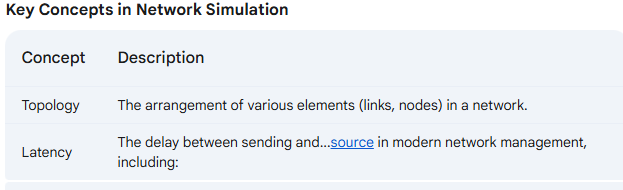
The delay between sending and...source in modern network management, including:
Network Design: Assists in planning and structuring new networks 1.
Performance Testing: Evaluates how networks handle different traffic loads 1.
Security Analysis: Identifies vulnerabilities and tests security measures 1.
Protocol Development: Enables the development and testing of new protocols in a controlled environment 2.
Education and Training: Provides a safe and controlled environment for learning and experimentation 3.
Analysis Tool: Predicts the effect of changes to network parameters 4.
Design Tool: Predicts the performance of new systems 4.
Challenges in Network Simulation
Despite its many advantages, network simulation also presents some challenges:
Complexity: Simulating intricate network topologies can be resource-intensive 1.
Scalability: Handling large-scale networks with numerous devices and connections often requires significant computational power 1.
Realism: Accurately replicating real-world network conditions, with all their nuances and complexities, can be difficult to achieve in a simulated environment 1.
Network Emulation
Network emulation is a technique for testing the performance of real applications over a virtual network 5. It differs from simulation in that it uses real applications and data in a virtualized network environment to accurately assess performance and behavior under specific conditions. Network emulation helps replicate real-world conditions and impairments faced by networks, such as bandwidth limitations, throughputs, latencies, and packet losses 7.
Methods of Emulation
Network emulation typically involves running software on a personal computer or virtual machine to emulate network behavior 6. Dedicated emulation devices are sometimes used for link emulation 6.
Applications of Network Emulation
Network emulation is used to:
Validate performance, stability, and functionality of devices, applications, products, and/or services against real-world network scenarios 6.
Test application behavior and performance in an environment that accurately replicates real-world networks 8.
Analyze the response time and sensitivity to packet loss of client-server applications 6.
Emulate specific network effects with different round-trip-times, throughputs, bit error rates, and packet drops 6.
Emulate physical distances and geographical locations, including the effects of delay, jitter, and packet drop caused by distance and network nodes 9.
Mitigate the risk of application failure due to changing network conditions 8.
Network Emulator Designs
Network emulators are designed with different use cases in mind. Some are specifically built for testing networks, while others focus on testing applications 8. This distinction is important because it influences the features and capabilities of the emulator.
Differences Between Network Simulation and Emulation
While both techniques are valuable for network analysis, they have key differences:
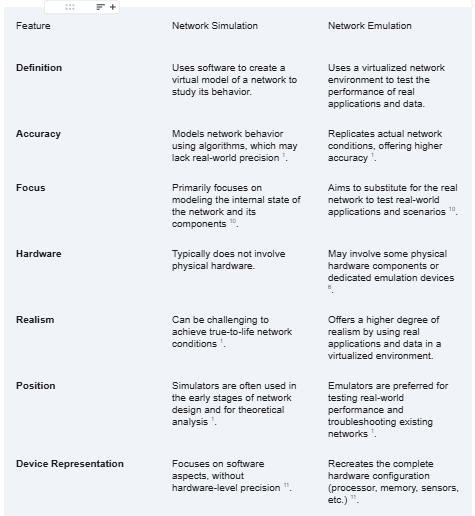
In essence, network emulators occupy a middle ground between simulators and real devices, mimicking both hardware and software features to provide a more comprehensive and realistic testing environment 11.
Comparing Applications of Simulation and Emulation
While network simulation and emulation have distinct applications, there are areas where their functionalities overlap. Both techniques can be used for:
Performance Testing: Evaluating how networks handle different traffic loads and identifying potential bottlenecks.
Security Analysis: Identifying vulnerabilities and testing security measures in a controlled environment.
Education and Training: Providing a safe and controlled environment for learning and experimentation with network protocols and configurations.
Advantages and Disadvantages of Network Emulation
Advantages
Realistic Testing Environment: Emulation provides a highly realistic testing environment by using real applications and data in a virtualized network. This allows for accurate assessment of performance and behavior under specific conditions 7.
Cost-Effectiveness: Emulation can be more cost-effective than setting up and maintaining physical testbeds, especially for complex network scenarios 7.
Flexibility: Emulators allow for easy configuration and modification of network parameters, enabling a wide range of testing scenarios 7.
Reduced Risk: By testing in a controlled environment, emulation minimizes the risk of disruptions to live networks 7.
Disadvantages
Resource Intensive: Emulation can be resource-intensive, requiring powerful hardware and software to accurately replicate real-world conditions 12.
Limited Scalability: Emulating very large and complex networks can be challenging due to limitations in processing power and memory 12.
Potential for Inaccuracies: While emulation strives for realism, it may not perfectly capture every nuance of real-world network behavior 12.
Tools and Technologies
Network Simulation Tools
Several tools are available for network simulation, each with its own strengths and weaknesses:
NS-3: A discrete-event network simulator for research and educational use 1.
OPNET: A comprehensive tool for network modeling and simulation 1.
Packet Tracer: A Cisco tool for simulating network configurations and troubleshooting 1.
GNS3: An open-source network simulator for designing complex network topologies 1.
Mininet: A network emulator that creates a realistic virtual network for testing 1.
OMNeT++: A modular, component-based simulator suitable for various network types 13.
QualNet: A commercial tool with advanced features for large-scale network simulation 13.
Cooja Sim: A tool specifically designed for simulating wireless sensor networks and IoT devices 13.
Network Emulation Tools
Some popular network emulation tools include:
WANem: An open-source tool for emulating WAN conditions like bandwidth limitations, latency, and packet loss 14.
Netropy: A commercial tool that provides comprehensive network emulation capabilities, including traffic shaping and impairment generation 14.
CORE: An open-source network emulator with a GUI-based interface for creating and managing network topologies 14.
GNS3: While primarily a simulator, GNS3 can also be used for network emulation by leveraging virtual machines and real devices 14.
EVE-NG: A powerful network emulator that supports a variety of network vendors and offers a user-friendly web-based interface 14.
Future Trends
The fields of network simulation and emulation are constantly evolving, with new trends and technologies emerging to address the growing complexity of modern networks. Some of the key future trends include:
AI and ML Integration: Artificial intelligence (AI) and machine learning (ML) are being integrated into network simulation and emulation tools to enhance their capabilities. This includes using AI for predictive analytics, anomaly detection, and automated network optimization 15.
Digital Twin Technology: Digital twins, which are virtual representations of physical networks, are becoming increasingly important for network planning and management. AI-powered digital twins can simulate real-world conditions, predict network behavior, and optimize performance 16.
Cloud-Based Emulation: Cloud computing is enabling more scalable and accessible network emulation solutions. Cloud-based emulators allow users to access powerful resources on demand, reducing the need for expensive hardware investments 17.
Hybrid Emulation: Hybrid emulation combines traditional hardware emulation with virtual prototyping to create a more flexible and powerful verification environment 17.
Conclusion
Network simulation and emulation are essential tools for network engineers and researchers. Simulation excels in modeling and analyzing network behavior in a controlled environment, while emulation focuses on testing real-world applications and scenarios in a virtualized network. Both techniques offer valuable insights into network performance, security, and scalability.
By understanding the differences, applications, and future trends in network simulation and emulation, professionals can leverage these technologies to design, optimize, and secure the next generation of networks. As networks become more complex and interconnected, the ability to accurately model and test their behavior will be crucial for ensuring reliable and efficient communication.
Works cited
1. What is a Network Simulation? - Lightyear.ai, accessed February 3, 2025, https://lightyear.ai/tips/what-is-a-network-simulation
2. Network Simulation : Different Types and Its Advantages - ElProCus, accessed February 3, 2025, https://www.elprocus.com/what-is-network-simulation-types-and-its-advantages/
3. What Is A Network Simulator? - ITU Online IT Training, accessed February 3, 2025, https://www.ituonline.com/tech-definitions/what-is-a-network-simulator/
4. Network SIMULATION, accessed February 3, 2025, https://www.uomus.edu.iq/img/lectures21/MUCLecture_2022_41023567.pdf
5. en.wikipedia.org, accessed February 3, 2025, https://en.wikipedia.org/wiki/Network_emulation#:~:text=Network%20emulation%20is%20a%20technique,channels%2C%20and%20protocols%20are%20applied.
6. Network emulation - Wikipedia, accessed February 3, 2025, https://en.wikipedia.org/wiki/Network_emulation
7. Use Network Emulation to Create Real-World Conditions | Keysight Blogs, accessed February 3, 2025, https://www.keysight.com/blogs/en/tech/educ/2024/network-emulation
8. NETWORK EMULATION ESSENTIALS - Networkology, accessed February 3, 2025, https://www.networkology.com/download/partners/iTrinegy_Network_Emulation_Essentials-2020.pdf
9. Network emulation use cases - Rugged Tooling, accessed February 3, 2025, https://ruggedtooling.com/solutions/network-emulation-tool/network-emulation-use-cases/
10. Simulator or Emulator? What is the difference? - Stack Overflow, accessed February 3, 2025, https://stackoverflow.com/questions/1584617/simulator-or-emulator-what-is-the-difference
11. Simulators vs. Emulators: What's the Difference, Anyway? - Sauce Labs, accessed February 3, 2025, https://saucelabs.com/resources/blog/simulators-vs-emulators-whats-the-difference-anyway
12. Exploring the Usability of Network Simulation Tools - Swansea University, accessed February 3, 2025, https://www.swansea.ac.uk/media/MSC-Thesis-Manal.pdf
13. Network Simulation Tools | Research Projects using Network Simulation Tools in NS2,NS33,Omnet++,Qualnet,Opnet,Peersim,Mininet, accessed February 3, 2025,
https://networksimulationtools.com/
14. Top 10 Network Emulators - DevOpsSchool.com, accessed February 3, 2025, https://www.devopsschool.com/blog/top-10-network-emulators/
15. Innovation Is Shaping the Future of Network Engineering - ISACA, accessed February 3, 2025, https://www.isaca.org/resources/news-and-trends/industry-news/2024/innovation-is-shaping-the-future-of-network-engineering
16. The Future of Telecom Network Planning with AI - Sand Technologies, accessed February 3, 2025, https://www.sandtech.com/insight/the-future-of-telecom-network-planning-with-ai/
17. Future Trends and Technologies in Emulation | Forum for Electronics, accessed February 3, 2025, https://www.edaboard.com/blog/future-trends-and-technologies-in-emulation.2299/